Homework 7 | CS 61A Spring 2024
Homework 7: Scheme
Due by 11:59pm on Thursday, April 4
Instructions
Download hw07.zip. Inside the archive, you will find a file called hw07.scm, along with a copy of the ok autograder.
Submission: When you are done, submit the assignment by uploading all code files you've edited to Gradescope. You may submit more than once before the deadline; only the final submission will be scored. Check that you have successfully submitted your code on Gradescope. See Lab 0 for more instructions on submitting assignments.
Using Ok: If you have any questions about using Ok, please refer to this guide.
Readings: You might find the following references useful:
Grading: Homework is graded based on correctness. Each incorrect problem will decrease the total score by one point. This homework is out of 2 points.
The 61A Scheme interpreter is included in each Scheme assignment. To start it, type python3 scheme in a terminal. To load a Scheme file called f.scm, type python3 scheme -i f.scm. To exit the Scheme interpreter, type (exit).
Scheme Editor
All Scheme assignments include a web-based editor that makes it easy to run ok tests and visualize environments. Type python3 editor in a terminal, and the editor will open in a browser window (at http://127.0.0.1:31415/). To stop running the editor and return to the command line, type Ctrl-C in the terminal where you started the editor.
The Run button loads the current assignment's .scm file and opens a Scheme interpreter, allowing you to try evaluating different Scheme expressions.
The Test button runs all ok tests for the assignment. Click View Case for a failed test, then click Debug to step through its evaluation.
Recommended VS Code Extensions
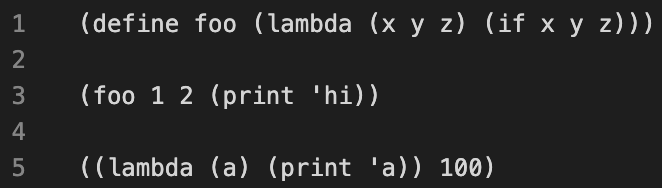
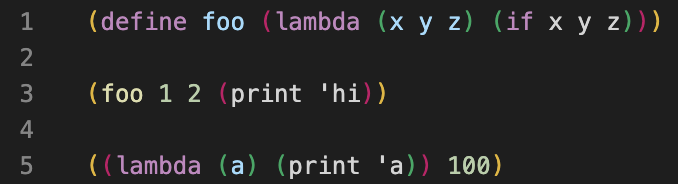
If you choose to use VS Code as your text editor (instead of the web-based editor), install the vscode-scheme extension so that parentheses are highlighted.
Before:
After:
In addition, the 61a-bot (installation instructions) VS Code extension is available for Scheme homeworks. The bot is also integrated into ok.
Required Questions
Getting Started Videos
These videos may provide some helpful direction for tackling the coding problems on this assignment.
To see these videos, you should be logged into your berkeley.edu email.
Q1: Pow
Implement a procedure pow that raises a base to the power of a nonnegative integer exp. The number of recursive pow calls should grow logarithmically with respect to exp, rather than linearly. For example, (pow 2 32) should result in 5 recursive pow calls rather than 32 recursive pow calls.
Hint:
For example, and .
You may use the built-in predicates
even?andodd?. Also, thesquareprocedure is defined for you.Scheme doesn't have
whileorforstatements, so use recursion to solve this problem.
(define (square n) (* n n))

(define (pow base exp)
  'YOUR-CODE-HERE
)
Use Ok to test your code:
python3 ok -q pow
Q2: Repeatedly Cube
Implement repeatedly-cube, which receives a number x and cubes it n times.
Here are some examples of how repeatedly-cube should behave:
scm> (repeatedly-cube 100 1) ; 1 cubed 100 times is still 1
1
scm> (repeatedly-cube 2 2) ; (2^3)^3
512
scm> (repeatedly-cube 3 2) ; ((2^3)^3)^3
134217728
For information on
let, see the Scheme spec.
(define (repeatedly-cube n x)
    (if (zero? n)
        x
        (let
            (_________________)
            (* y y y))))
Use Ok to test your code:
python3 ok -q repeatedly-cube
Q3: Cadr
Note: Scheme lists are covered in the lecture videos for Wednesday, April 3.
Define the procedure cadr, which returns the second element of a list. Also define caddr, which returns the third element of a list.
(define (cddr s)
  (cdr (cdr s)))

(define (cadr s)
  'YOUR-CODE-HERE
)

(define (caddr s)
  'YOUR-CODE-HERE
)
Use Ok to test your code:
python3 ok -q cadr-caddr